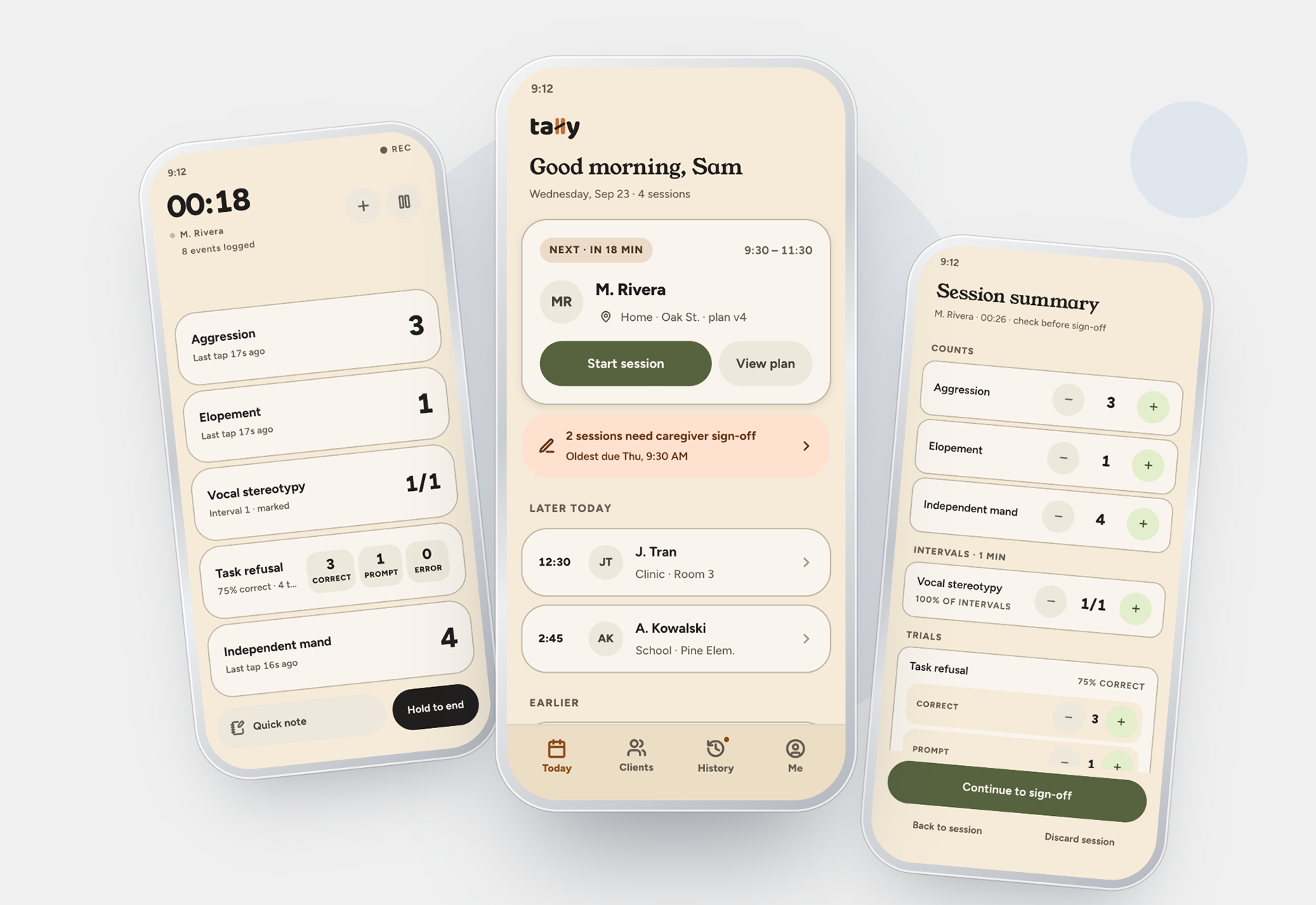
A mobile tool that redesigns the single hardest moment in ABA therapy - logging behavior data live, one-handed, without breaking focus on the child.
Role
My role was the UX/Product Designer for research, flow, visual design and prototype.
The tools I used were: Claude for research synthesis, Claude Design for high fidelity prototypes, and Claude Code for the interactive prototype.
Overview
Behavior interventionists deliver 1:1 ABA sessions while simultaneously logging behavior data, usually on a company-issued iPad running an app built like a digital paper form. I designed a focused alternative for the single hardest moment in that workflow: capturing data during the session without losing attention on the child.
The Problem
Behavior interventionists already have digital tools, company-issued iPads running an app with multiple sections of checkboxes and free-text fields. But the interaction model mirrors a paper form, not a live session: logging data means navigating between sections and typing in the moment, pulling attention from the child. When something unexpected happens, interventionists cope by deferring, mentally noting it to log after the session, or jotting a quick note to expand on later. That workaround means data is often reconstructed from memory rather than captured live, and several interventionists said data sometimes gets missed or logged inaccurately as a result.
Who this is for
Behavior interventionists and RBTs using company-issued iPads to log session data in real time, typically tracking multiple behaviors while actively delivering instruction to a child, and who have already built workaround habits, like deferring full entry until after the session, to protect their attention during it.
Research
Method: 20-minute conversations with former colleagues currently working as behavior interventionists, walking through a recent session step by step rather than asking abstract questions about "what they'd want."
What I asked:
1. Walk me through your most recent session, start to finish, what were you tracking, and how?
2. What tool or method are you using right now? What made you land on that?
3. Tell me about a time the data logging got in the way of the actual session.
4. What happens when something unexpected occurs — how do you log it without breaking focus on the kid?
5. If you could wave a wand and fix one part of this, what would it be?
6. Do you ever lose or misremember a count? What usually causes that?
What I expected going in: this workflow is already digital. Interventionists log on company-issued iPads. What I wanted to understand was why logging still gets in the way
What research actually showed: the tool is already digital. The failure isn't the medium, it's the interaction model, a multi-section, checkbox-and-text-field app that requires navigating and typing mid-session, the same cognitive load as paper, just on a screen.
Four themes of the interviews
1. Digital ≠ designed for the moment. Modern hardware didn't solve the core issue — the interaction model is the failure point, not the device.
2. Deferred logging is already the coping strategy. Interventionists split their own workflow into "quick note in the moment" and "full detail after," because the tool doesn't support fast in-session capture.
3. Missed or inaccurate data comes from memory-reliance, not carelessness. Confirms the core problem with real evidence.
4. "Easier and more effective" means fewer taps and less categorizing, not a longer feature list.
Competitive Landscape
Nearly every interviewee named the same leading enterprise ABA platform as what they actually use in the field. It's an all-in-one system, billing, scheduling, compliance, and data collection all in one place which shapes the in-session logging screen: it's built to serve the clinical and administrative record first, with the live one-handed moment inheriting that same dense, form-based structure.
That structural gap shows up directly in independent user reviews, not just interviewee impressions. Users report being logged out mid-session and dropped back to the home screen rather than returning to where they left off, sometimes losing unsaved data entirely one reviewer noted the app requires a manual save after every single data point to avoid this. Offline mode has also been reported as unreliable enough that some in-home sessions fall back to paper entirely, which is the opposite of what a field tool needs to guarantee. Notably, this runs counter to the platform's own marketing, which frames its mobile app as intuitive and built to shorten the learning curve for new users.
This is a meaningful finding for the case study: the tool most of the field already relies on has documented, independently-reported reliability gaps at exactly the moment my research identified as highest-risk live, in-session, one-handed data capture.
Design Principles
One-handed, glance-and-tap, no typing during a session
No more than a 1–2 second glance required per log
Two-phase by design — near-zero-attention capture in the moment, then a fast structured way to add detail immediately after, while memory is fresh (matching the workaround interventionists already use themselves)
Offline-first — sessions save to the device the moment they're logged, then sync to the clinic's record when a connection is available. The interventionist never has to think about connectivity mid-session, and the interface is honest about sync state rather than hiding it: an unsynced session shows a visible status until it's confirmed to have reached the clinic record.
Accounts for slight delay logging something that happened seconds ago, not instantaneously
Designed for interruption, not just the happy path — a session can be paused, resumed, or cut short by something out of the interventionist's control, and the tool has to survive that without losing data or creating ambiguity about what actually happened
Visual Design
The brief going into high-fidelity design was a real tension to resolve, not just a style preference: this needed to feel professional enough for a BCBA to trust and a caregiver to see referenced in a report, while still feeling human enough for something interventionists use dozens of times a day. The instinct to solve that with gamification: badges, streaks, celebratory animation was deliberately ruled out going in, since this sits next to clinical documentation, not a habit tracker.
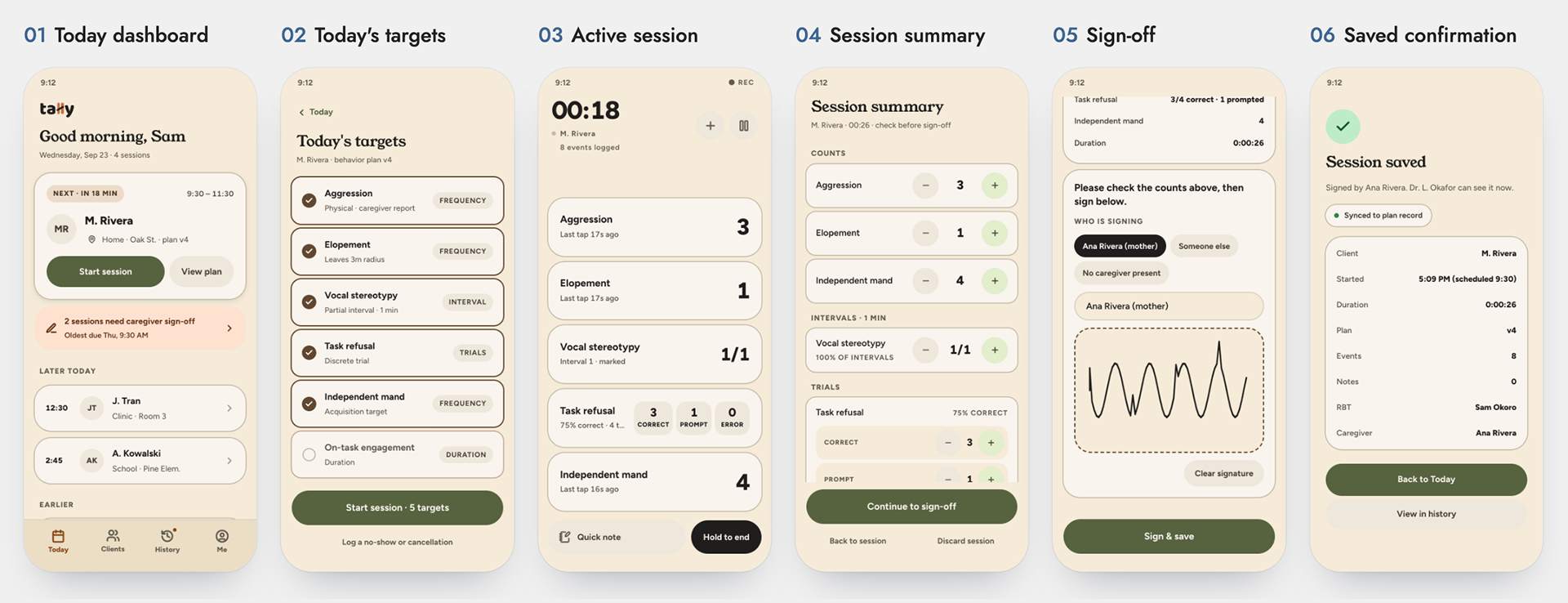
The resulting direction (an "Organic" system) resolves the tension through warmth in materials rather than playfulness in mechanics: a cream-and-terracotta palette with a sage second accent, soft over-rounded cards and pill-shaped buttons, and a display serif for headings paired with a clean sans for body and data. Icons run at a heavier stroke weight for a rounder, less clinical-cold feel. The "fun" lives entirely in tactile response, a tap that visibly and immediately confirms itself rather than in decoration; there's no mascot, no confetti, no progress-bar-as-game. Professionalism is carried by restraint: a single confident accent color used purposefully for primary actions, generous whitespace instead of dense clinical tables, and quiet, serious moments (the sign-off screen, the "session saved" confirmation) with no celebratory flourish at all.
This is the resolution worth naming explicitly in the case study: fun and professional weren't balanced by splitting the difference, they were assigned to different layers. Professional lived in structure, data density, and restraint. Warmth lived in shape, color, and responsiveness.
The Flow
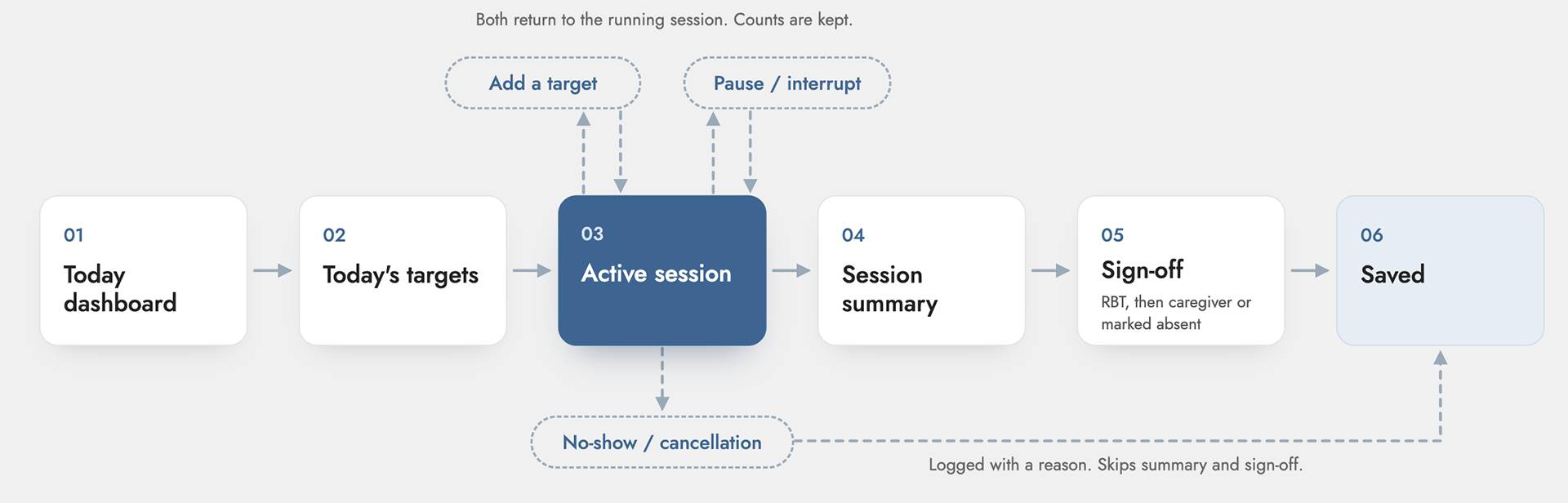
The two-phase structure (fast capture during, detail after) held up through to the final build, but the flow grew well beyond the original plan as real-world edge cases got designed for, not just the happy path.
Sign-off became two signatures, not one. The interventionist (RBT) signs first, attesting the data was recorded as it happened; that's then handed to the caregiver to countersign. But a caregiver isn't always present at the moment a session ends so the flow explicitly supports marking the caregiver absent, which saves the session as "caregiver not present" with that status visible to the supervising BCBA, rather than forcing a fake signature or blocking the interventionist from closing out their day. A "save now, sign later" fallback exists at every step so sign-off never blocks the interventionist from moving on.
Mid-session, the plan can change. Real behavior plans don't perfectly predict a session, a target that wasn't pre-selected sometimes needs to be tracked once something happens. An "add a target" control lets the interventionist pull in an untracked behavior from the client's plan without leaving the Active Session screen, with a note automatically recorded marking it as added mid-session. This is a direct answer to the research finding that unexpected events get deferred or missed instead of forcing a workaround, the tool now supports the moment it happens.
Sessions survive interruption. If a session is interrupted, the app closes, the phone locks, something pulls the interventionist away. Tally saves the in-progress state locally and offers to resume exactly where it left off the next time it opens, rather than losing the data or forcing a restart. A parallel flow handles sessions that never happened at all: a clear "log a no-show or cancellation" path, with a few honest categories (client no-show, cancelled by family, cancelled by clinic) rather than leaving that gap unrecorded.
Mistakes are recoverable, not punished. A "wrong client?" control lets the interventionist discard and restart if they started logging against the wrong profile, a double-tap-to-confirm pattern, so it can't be triggered by accident but also doesn't trap someone in a bad session. Any data edited after the session ends is visibly tagged "edited after session" in the summary and sign-off, so the record stays honest about what was captured live versus corrected afterward.
The Active Session screen also ended up supporting more than one data type, frequency tallies and duration/partial-interval timing (a behavior tracked by how long it lasts, not how many times it happens) sit in the same glanceable list, each with its own inline control. The original scoping decision was to go deep on frequency only; in practice, real behavior plans mix data types, and a tool that only handled tallies would have felt incomplete against an actual client plan.
Small interaction details from the build worth naming: an undo toast after starting a timed behavior (protects against an accidental tap without adding a confirmation step that would slow down live logging), and a "hold to end" control on ending a session rather than a single tap, a deliberate friction point, since ending a session is the one action here that shouldn't be easy to trigger by accident.
Process
High-fidelity design and the interactive prototype were built in Claude Design, working from a brief that specified the user, the one-handed/glance constraint, and the specific tension between "professional" and "fun" that needed resolving rather than leaving tone to be guessed at screen by screen. The tool generated the full connected flow as a tappable prototype, which is what surfaced the sign-off step and the dual data-type handling as real needs once the flow was built end-to-end rather than as isolated frames.
The work moved in three stages, low-fidelity to final:
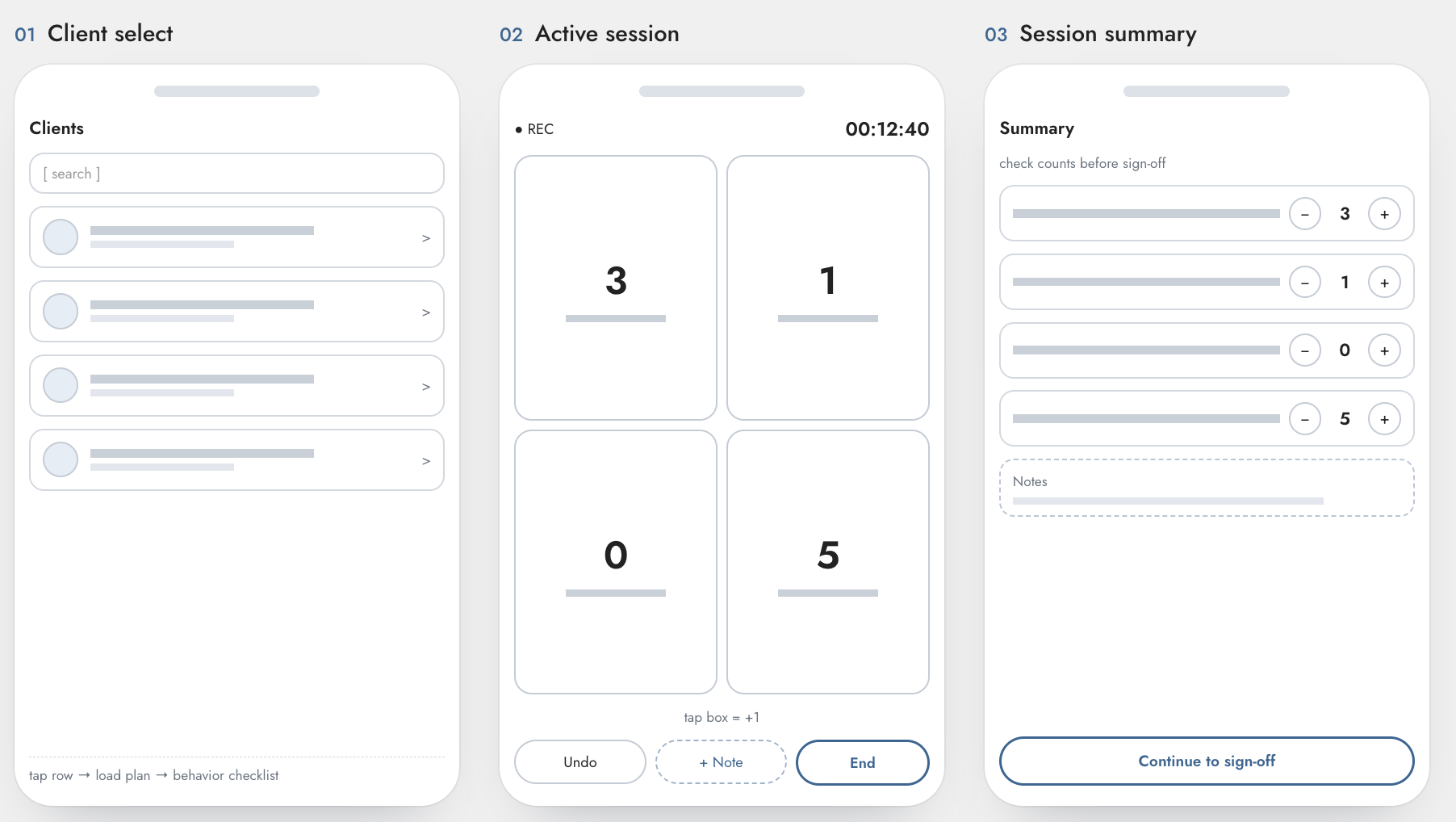
1. Low-fidelity wireframes — sketched immediately after research, before any visual direction was decided, to lock the screen sequence and the core interaction (one tap = one log) while it was still cheap to change.
2. High-fidelity prototype — built in Claude Design once the flow was validated, applying the Organic visual system across all six screens: Today dashboard, Today's targets, Active session, Session summary, Sign-off, and Saved confirmation.
3. A working, stateful build — the prototype moved beyond tappable static frames into a real functioning app: sessions persist locally as they're logged, survive an interruption and offer to resume, track which entries were edited after the fact, and reflect an honest sync status rather than assuming connectivity. Building it as working software, not just a visual sequence, is what actually surfaced the edge cases above: interruption, absence, no-shows, wrong-client recovery, because those only become obvious once you're asking "what does the app do here," not "what does this screen look like."
The low-fi flow held up through to final design; what changed was scope (a second sign-off signer, mid-session flexibility, interruption handling, dual data types) and tone (resolving "fun vs. professional" through the visual system, not the structure).
Usability Testing
Method: 5–6 practicing RBTs and BCBAs tested the working prototype directly, logging a simulated session end-to-end rather than reacting to static screens. Testing ran across multiple iterations, issues found in an early pass were fixed before the next round, so later testers were reacting to a revised build, not the same one repeatedly.
What testing found:
1. Card contrast was too low in real field lighting. The white session cards sat on the cream background nearly indistinguishable in a controlled setting, but RBTs pointed out they work at kitchen tables, on playgrounds, and in bright classrooms, where that soft, low-contrast look would fade out entirely. Fixed with a darker card background and a thin border to hold the card's edge in bright, uncontrolled light.
2. The "caregiver signs later" link failed accessibility contrast in its disabled state against a minimum for text. An easy miss in a mockup, but a real barrier for anyone with low vision trying to read it in the field. Fixed by darkening the disabled-state color.
3. Frequency and duration targets were visually identical until a timer was actually running. Testers couldn't tell which type of target they were looking at at a glance, the entire point of a glanceable, one-handed interface until they'd already started interacting with it. Fixed by adding a small stopwatch icon to duration targets, so the type is legible before the first tap, not after.
What held up: The two-phase capture model (fast tally during the session, detail added after) worked the way it was designed to, testers used it as intended rather than reaching for a different workflow. The interruption/resume flow also behaved as expected when tested directly: testers who simulated an interrupted session were able to pick up where they left off without confusion. Overall reception of the visual design and the color system was strongly positive and testers specifically called out the look and feel, not just the function, as something they'd want to actually use.
Outcome and Reflection
Where this stands: Research focused the project before a single screen was drawn. I went in assuming the core problem was digitization that behavior interventionists were still logging data on paper. Interviews showed the opposite: the tool is already digital, and the real failure is the interaction model. The existing app mirrors a paper form's structure: multiple sections, checkboxes, free-text fields inside a modern device, which recreates the same mid-session attention cost paper always had. That correction shaped every design decision after it: the two-phase flow (fast tally during, detail after) isn't a compromise I designed around a constraint, it's a direct match for the coping workaround interventionists described already using themselves, just without a tool built to support it properly.
Scoping to a single data type frequency tally logging, was also a deliberate choice, not a limitation I ran into. ABA data collection covers frequency, duration, ABC narrative logging, and DTT trial-by-trial recording, each with different interaction demands. Designing for all four inside one MVP would have diluted the one thing this project is actually testing: whether a genuinely one-handed, glanceable interaction model reduces the memory-reliance problem interviewees described. Depth on one data type over shallow coverage of four.
That said, building the full flow end-to-end surfaced several places I loosened that scope: duration/partial-interval tracking got added alongside frequency, sign-off grew from one signature to two (with an explicit path for when a caregiver isn't present), and the build ended up handling interruption, mid-session plan changes, and no-shows as first-class flows rather than edge cases to ignore. Each of these traces directly back to something research surfaced — interventionists already cope with interruptions and unexpected events by deferring or working around a tool that doesn't support the moment, and a session logger that only worked for a clean, uninterrupted session would have replicated that same gap.
What testing confirmed and what it corrected: The core interaction model held up the two-phase capture flow and the interruption/resume behavior both worked the way they were designed to, in front of the exact users they were designed for. But testing also caught what research alone couldn't: three real usability issues that only surface once someone is actually holding the thing. All three shipped as fixes before the next round of testing, not as notes for later.
What I'd do differently: I'd build the tappable prototype and start recruiting testers in parallel with the later interviews, rather than sequencing them, a couple of early test sessions might have surfaced questions worth adding to the last two or three interviews.
Where this leaves the project: The problem was validated by real interviews, the competitive gap was validated by independent evidence, and the solution itself was validated by testers who do this work for a living including the parts of the design I was least certain about, like whether the interruption-handling and dual-signature flows would actually make sense to someone encountering them cold. They did. What's left is exactly what I expected going in: I knew a lot can go wrong mid-session, and designing for that turned out to matter as much as the core tally interaction itself. The fixes from testing are in; the next real step is a small pilot with an actual clinic willing to use it for a full week, since a simulated session in a testing setting still isn't the same as a live one with a real, unpredictable kid in the room.